

Adding Customily to Your merchOne Store: Setup Guide, Product Selection, and Q4 Planning
Quick answer: Adding Customily to a merchOne store means customers personalize products directly on the listing page – uploading photos, entering names, applying AI effects – while a live preview updates in real time. Once they check out, the order routes automatically to merchOne for production and shipping. The Customily-merchOne connection is set up inside Customily‘s POD Integrations dashboard, takes approximately 5 minutes, and runs alongside existing products without changing how active orders currently fulfill.
Personalized products are a primary purchase category across the four gift events that drive the largest spikes in gift-oriented search and purchase behavior: Mother’s Day, Father’s Day, Valentine’s Day, and Christmas. The global personalized gifts market was valued at approximately $35.3 billion in 2023 and is projected to grow at 8.35% CAGR through 2028 (Technavio).
Key Takeaways
- Setup time: approximately 5 minutes from install to catalog loaded in Customily – one dedicated merchOne store required per Customily storefront.
- 71 products available inside Customily from the merchOne catalog across Wall Decoration, Home Decor & Accessories, Apparel, and Pet Products.
- Automated order flow: Customily generates the print file, routes to merchOne via API, tracking syncs back to the store – no manual file prep required.
- Best starter products: Canvas and wall art for high-intent search traffic; mugs and blankets for gift seasons; apparel for year-round and corporate gifting.
- Pre-launch essentials: enable DPI warning, order a physical sample, write a custom returns policy, configure surcharges for premium personalization options.
- Q4 timing: Halloween listings live before October 1; Christmas and Hanukkah listings with physical samples completed before mid-November.
Why do merchOne sellers add product personalization?
Both personalized and non-personalized products play an important role in a strong ecommerce catalog. Non-personalized items can perform well through appealing designs, competitive quality, trend relevance, and fast purchase decisions. Personalized products add another layer of value by allowing buyers to create something more specific to their occasion, recipient, or personal story.
When a buyer adds their own photo, name, date, or message, the product becomes more emotionally connected to them. This can help sellers strengthen buyer engagement during gifting seasons such as Black Friday, Christmas, birthdays, and anniversaries, while also creating more opportunities for repeat purchases around future occasions.
For sellers already using merchOne for wall decoration, home decor, or apparel, adding Customily personalization to existing products offers a practical way to expand into personalized gifting without replacing their current catalog, adding unnecessary SKU complexity, or changing the fulfillment workflow.
How does Customily work with merchOne?
Customily connects with merchOne through a direct API integration, creating a smoother workflow for sellers who want to offer personalized merchOne products. Once a merchOne store is connected inside Customily, sellers can browse the merchOne product catalog directly in Customily’s product builder and import selected products with just a few steps.
After a personalized order is placed, the completed order and print file are sent to merchOne automatically through the API. From there, merchOne handles production and fulfillment, while order status and tracking information update back to the storefront once the order ships. This helps sellers manage personalized product orders more efficiently without adding manual file transfer or order-forwarding steps.
Start personalizing products with Customily
Register with Customily to explore real-time previews, AI effects, maps, puzzles, and other personalization tools built for modern product customization.
Create more engaging personalized listings and stay ahead in the personalized product market.
How to set up the Customily-merchOne integration
- Install Customily on your Shopify (or supported) store.
- Open the Customily dashboard and navigate to POD Integrations.
- Select merchOne from the provider list.
- Authenticate with your merchOne store credentials.
- The merchOne catalog loads inside the Customily product builder.
One configuration point: each integration requires a dedicated merchOne store. Sellers running multiple Customily storefronts on the same platform need one merchOne store per storefront. One-time step per storefront.
Which products work best as a starting point?
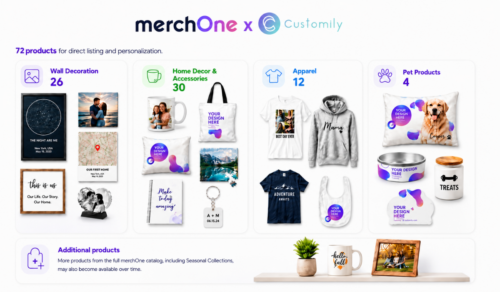
Of the 72 merchOne products available inside Customily, a few categories make especially strong starting points: canvas and wall art, mugs, blankets, and selected apparel products.
These categories are easy for shoppers to understand, work well with personalization, and fit common gifting occasions.
Canvas and wall art are a natural place to start because they match merchOne’s strength in wall decoration and home decor. Products like Canvas, Posters, Framed Posters, Acrylic Prints, and Metal Prints work especially well with photo uploads, names, dates, custom maps, star maps, family portraits, memorial designs, and anniversary artwork. For buyers, personalized wall art often carries strong emotional value because it is tied to family memories, home decoration, weddings, milestones, or special places.
Mugs are another strong entry point for personalized gifting. They are familiar, affordable, and easy to customize with names, photos, messages, illustrations, inside jokes, or seasonal designs. This makes them a good fit for holidays such as Christmas, Valentine’s Day, Mother’s Day, Father’s Day, birthdays, anniversaries, teacher gifts, and office gifts.
Blankets, especially Premium Blankets, are also a strong option because they combine personalization with comfort and perceived gift value. They work well for family photo designs, couple gifts, pet portraits, memorial gifts, baby gifts, and holiday campaigns. Since buyers often expect personalized blankets to feel soft, durable, and well-made, product quality plays an important role in the overall customer experience.
Apparel, including T-shirts, hoodies, and sweatshirts, can also work well when it fits the seller’s audience or campaign. These products are useful for simple text-based designs, family matching shirts, group events, team orders, pet-themed designs, corporate gifting, and seasonal collections. However, apparel can be more dependent on size, fit, color preference, personal style, and trend timing, so it may be best positioned as a targeted category rather than the first default choice for every seller.
Together, these products give sellers a practical way to start with the Customily–merchOne integration: wall art for emotional home decor, mugs and blankets for gift-driven demand, and apparel for selected audiences or campaign-based personalization.
| Category | Products available in Customily |
|---|---|
| Wall Decoration | Canvas · Acrylic Print · Premium Acrylic Print · Acrylic Print on Metal · Metal Print · Metal Print (Gloss Finish) · Photo Board · Framed Photo Board · Passepartout · Wood Panel · Wood Block · MixPix · Canvas Wall Hanging · Poster · Poster GM · Framed Poster · Adhesive Poster · Wall Tapestry · Round Photo Print · Table Top Print · Framed Floating Photo · Framed Fabric Wall Art · Kids Measuring Bar · Metal Door Plate · Acrylic Block · Acrylic Heart |
| Home Decor & Accessories | Classic Mug · Mug Premium · Magic Mug · Enamel Mug · Heart Mug · Travel Mug · Inner Colored Mug with Colored Handle · Seasonal Mug · Premium Pillow · Standard Pillow · Cotton Pillow · Premium Pillow Cover · Premium Blanket · Standard Blanket · Bed Linen · Cotton Bed Linen · Towel · Sports Towel · Rug · Shaped Rug · Tote Bag · Puzzle · MIXBLOX · Mouse Pad · Notebook · Snow Globe / Glitter Picture Frame · Heart Keyring · Rectangular Keyring · Window Blinds (Daylight) · Window Blinds (Blackout) |
| Apparel | T-Shirt · Hoodie Unisex · Unisex T-shirt Bella Canvas 3001 · Unisex T-shirt Gildan 5000 · Unisex T-shirt Stanley Stella Creator 2.0 · Unisex Hoodie Gildan SF500 · Unisex Hoodie B&C WU33B · Unisex Hoodie Stanley & Stella Cruiser 2.0 · Unisex Sweatshirt Gildan SF000 · Unisex Sweatshirt Stanley & Stella Roller · Unisex Sweatshirt Stanley & Stella Changer 2.0 · Baby Bib |
| Pet Products | Dog Pillow · Dog Bowl · Treat Jar · Paw rug |
Get 30 Days Free with Customily
Shopify sellers using merchOne can now try Customily for 30 days free instead of the regular 9-day trial. Use this extended trial to explore live previews, product personalization, and custom workflows before adding them to your store.
How to add personalization to a product
Adding personalization to a merchOne product in Customily is simple. Sellers can create the product design, add editable personalization fields, set up a live preview, and make sure the order data and print file are sent to merchOne correctly before publishing.
Step 1: Create your design in Customily’s Design Studio
Start by creating a design in Customily’s Design Studio. You can upload your own artwork, import artwork from Canva, or create something new from scratch. If you do not want to build a design yourself, you can also start with one of Customily’s pre-made designs.
Step 2: Pick a product from the merchOne catalog
Choose the merchOne product you want to sell, then select the variant you want to offer if variants are available.
Step 3: Add your personalizable design to the product
Apply the design you already created to the merchOne product. You can also choose a design from Customily’s collection if you prefer to start with a ready-made option.
Step 4: Adjust the design for the live preview
Position and scale the design so it fits the product correctly. This helps shoppers see an accurate preview of what their personalized product will look like.
Step 5: Edit your product listing
Set up the main product photo, title, description, pricing, and other product details. You can also generate realistic AI photo mockups from this step.
Step 6: Set product rules if needed
If your product includes different customer options, set rules so the right design elements appear based on each shopper’s selections.
Step 7: Run a test order before publishing
Before making the product live, place a test order to confirm that the personalization details, print file, and order information are sent to merchOne correctly.
Print quality standards for merchOne products
To help customers receive the best possible print result, sellers should prepare design files at 300 DPI or higher. For wall decoration products such as canvas, acrylic prints, and metal prints, it is important to follow merchOne’s recommended print area dimensions for each product size so the final artwork appears sharp and properly aligned.
If a file is too small, enlarging it may make the design look less clear, especially around edges, corners, or detailed areas. Colors can also look slightly different between a digital screen and the final printed product because screen colors and print colors are not produced in the same way. For this reason, ordering a physical sample before publishing can help sellers check the final result and make adjustments if needed.
For products that allow customer photo uploads, sellers can enable Customily’s DPI warning to help buyers avoid uploading low-resolution images. merchOne also offers samples at base production cost, giving sellers a practical way to review product quality before offering it to customers.
Common mistakes to avoid before launching personalized products
Before publishing a personalized product, sellers should review a few important setup details. These checks help protect the buyer experience and reduce avoidable issues after the first orders come in.
Skipping the test order A test order should be completed before launch to confirm that the personalization data, print file, and order details are sent to merchOne correctly.
Using one artwork file for all size variants Different product sizes may require different print dimensions. Each size should use artwork that matches its correct print area.
Leaving the DPI warning turned off Customer-uploaded photos may not always be high resolution. Enabling the DPI warning in Customily helps customers avoid uploading images that may not print clearly.
Not explaining processing time Personalized products usually require extra production time compared with ready-made items. Stating the processing time clearly in the product description helps set the right delivery expectations.
Not including a clear return policy Since personalized products are made to the customer’s specifications, they may not be returnable for buyer’s remorse. A clear return policy helps reduce misunderstandings and disputes.
Back-to-school products that convert well with Customily
Back-to-school can be a strong season for personalized products because buyers are often shopping for students, teachers, dorm rooms, and school-related gifts. Sellers can prepare listings before the main shopping period begins to better capture demand from parents, students, and gift buyers.
Class-of-year apparel, such as personalized T-shirts, can work for individual student purchases, group orders, clubs, or school events. Sellers can use one Customily template to let customers update names, class years, school names, or group text.
For college move-in, personalized home decor products can be especially relevant. Canvas prints with a hometown street map, campus area map, or meaningful location can make a dorm room feel more personal. Premium Pillows and Premium Blankets with photo personalization can also work well as parent-to-student gifts.
Teacher gifts are another useful back-to-school category. Classic Mugs and Magic Mugs can be personalized with the teacher’s name, subject, school, or a short message, making them easy gift options for parents and students.
For US orders, merchOne’s Columbus, Ohio facility can support domestic fulfillment, helping reduce potential customs-related delays.
Which products and features work best for Q4 holidays?
Q4 is one of the most important seasons for personalized products because many buyers are looking for meaningful gifts. Sellers can prepare holiday listings in advance and run test orders before peak shopping periods.
Halloween Canvas and posters can work well with Customily’s AI photo effects. Buyers can upload a pet or family photo and turn it into Halloween-inspired artwork using effects such as cartoon or watercolor styles.
Thanksgiving and Black Friday/Cyber Monday Premium Blankets with family photos and custom crossword designs on canvas can be strong gift options. Personalized products are especially useful during promotional periods because each order feels unique to the buyer.
Christmas and Hanukkah Magic Mugs, Snow Globe or Glitter Picture Frames, star map canvases, and Premium Blankets are suitable for seasonal gifting. These products work well with names, photos, dates, locations, and meaningful messages.
New Year’s Eve Star maps and street maps on canvas or framed posters can be used to mark a special date and place. One template can support many different customer stories because each buyer enters their own date and location.
Together, these seasonal opportunities show how sellers can use Customily personalization with merchOne products to create listings for different gift occasions, from school milestones to major Q4 holidays.
Connect Customily personalization with merchOne fulfillment
Use the direct Customily–merchOne integration to turn personalized product designs into print-ready files and route orders to merchOne for automated print-on-demand production.
Explore the Customily–merchOne integration →
Build personalized merchOne listings with live previews, automated print-file generation, and connected fulfillment.
Frequently Asked Questions
How does adding personalization affect product margins?
Personalized products typically command higher prices than equivalent non-personalized items because the end product is specific to the buyer. That specificity also reduces pricing pressure from generic competition – there is no direct equivalent to compare against. The actual margin improvement depends on the product type, personalization complexity, and the surcharges configured for premium options inside Customily.
Which merchOne products are available for personalization through Customily?
71 merchOne products are currently available inside Customily across Wall Decoration (Canvas, Acrylic Print, Metal Print, Poster), Home Decor & Accessories (Classic Mug, Magic Mug, Premium Pillow, Premium Blanket), Apparel (T-shirts, Sweatshirts, and Hoodies from Bella Canvas 3001, Gildan 5000, Stanley Stella Creator 2.0), and Pet Products (Dog Pillow, Dog Bowl, Treat Jar).
How long does the Customily-merchOne integration setup take?
The Customily-merchOne integration setup is quick and straightforward. In most cases, connecting both accounts takes about five minutes. After that, sellers can choose the products they want to list from the merchOne catalog and build or apply personalization templates using Customily’s Design Studio. The time needed to prepare each product may vary depending on the design, product options, and level of personalization.
What happens if a customer uploads a low-resolution photo?
Customily includes a DPI warning feature that flags low-resolution photo uploads before an order is submitted. When enabled, customers see a notification and can upload a higher-quality version before checkout. Enabling this setting is recommended for any product that accepts customer photo uploads.