

What Is Teeinblue and How Does It Work?

Teeinblue is a product personalization app for e-commerce sellers that lets customers customize products with their own text, photos, and design choices, then automatically generates print-ready files and routes orders to fulfillment partners. The app supports Shopify, Etsy, WooCommerce, Magento, BigCommerce, Wix, and other website builders, with the deepest feature set available on Shopify, where most merchOne integrations run. For merchOne sellers building personalized wall decoration, home decor, apparel, and pet product stores, Teeinblue is one of the API-integrated personalization apps that connects directly to a merchOne account, with full catalog access, automated order routing, and tracking sync built into the workflow. This guide covers what Teeinblue does, how the workflow runs from customer to production, and how the integration with merchOne fits into a personalized POD store.
Get 50% off Teeinblue for your first month
Install Teeinblue on Shopify through the link below and the 50% discount applies automatically for one month.
Discount auto-applies through this link only.
What Teeinblue actually does
On the customer side, Teeinblue replaces the static product page with a live customization interface. Personal details are entered field by field, and the product preview updates in real time as the design takes shape. By the time a customer reaches checkout, they’ve already seen the exact product they’re buying.

Customers can personalize products in several ways:
- Add custom text such as names, dates, quotes, or messages
- Upload their own photos, with automatic background removal available
- Select fonts, colors, and design elements from preset options
- Combine multiple personalization fields into a single design
The technical work happens at checkout. Teeinblue’s print engine generates the output file at the exact resolution and dimensions the fulfillment partner requires – 300 DPI on a 30×40 cm Canvas, the correct color profile for a Bella Canvas 3001 t-shirt, the right wrap allowance on a 4 cm deep canvas frame. The file moves to production already matched to the press it will print on, which is what allows the integration to operate without manual proofing or file adjustment between checkout and shipment.
On the seller side, the workflow is built around an order review step. Customer orders flow from Shopify into the Teeinblue dashboard, where the seller confirms the personalization details and clicks Send. From there, the print file routes to merchOne through the API, and carrier tracking syncs back to the Shopify order automatically once production ships. This review step is intentional: it gives the seller a chance to catch typos or upload issues before an order moves into production.
Which platforms Teeinblue supports
Teeinblue offers four product lines built around different e-commerce platforms, so sellers can run personalization on whichever platform their store is built on:
- Teeinblue for Shopify — the original product, distributed through the Shopify App Store, with the deepest feature set and the largest network of API-integrated POD partners including merchOne
- Teeinblue for Etsy — a dedicated product for Etsy sellers, with personalization synced to Etsy listings and orders
- Teeinblue Boundless — launched in March 2025, this package extends Teeinblue to WooCommerce, Magento, BigCommerce, Wix, Shopline, and other website builders through plugin or iframe integration
The Shopify version remains the recommended path for sellers using merchOne, since the API-direct integration between merchOne and Teeinblue runs natively on Shopify and supports automatic catalog browsing, one-click product import, order routing, and tracking sync.
Who Teeinblue is built for
Teeinblue is built for e-commerce merchants whose business model depends on customers adding their own input to a product before purchase. The categories where it performs strongest include:
- Personalized wall decoration and canvas prints
- Custom apparel such as t-shirts, hoodies, and sweatshirts
- Pet products including dog bowls, dog pillows, and pet-themed home decor
- Family and anniversary gifts
- Custom Christmas ornaments and seasonal decor
- Memorial prints and keepsakes
- Custom team and fan merchandise
These categories align closely with merchOne’s full product range, which is one reason the two platforms are commonly used together. The app scales from one-product side projects to enterprise operations like LFC Thailand’s licensed Liverpool FC merch store. For sellers who only offer pre-made designs with no customer input, a personalization app is unnecessary. The moment a product needs even one custom field, however, Teeinblue replaces a stack of separate text-field apps and manual proof workflows that would otherwise consume seller time as order volume grows.
How the workflow runs from customer to production
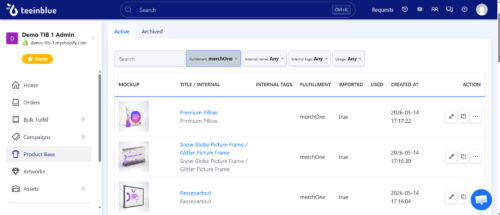
The Teeinblue workflow follows the same four-step pattern regardless of product type or fulfillment partner:
- Add a product — import it from a connected fulfillment partner or upload mockups manually
- Build the design in the Artwork Editor with personalization layers (text fields, photo uploads, color pickers, font selectors, conditional logic)
- Publish the product to the store with the personalization form attached
- Fulfill orders automatically — Teeinblue generates the print-ready file from customer inputs and pushes the order to the fulfillment partner, with tracking flowing back to the store on its own
Once your store is live, the seller’s only real manual task is responding to customer change requests — for instance, when a buyer wants to swap a color, correct a name spelling, or replace an uploaded photo. From the dashboard, you regenerate the design and resend it to fulfillment in a few clicks.
Everything else operates in the background. Print file generation, order routing, fulfillment dispatch, tracking sync — all automated through direct API integration with your POD partner.
That’s the architecture that holds up when seasonal demand spikes 5–10x within days. Manual touchpoints stay where they belong: with the customer, not the workflow.
Why merchOne integrates with Teeinblue
Teeinblue is one of the personalization apps merchOne supports through a direct API integration, built for Shopify sellers who want customers to customize products before checkout. The integration is designed to handle the high-volume, low-touch order flow that personalized POD stores generate across merchOne’s full catalog — wall decoration, home decor, apparel, and pet products — particularly during seasonal peaks like Mother’s Day, Christmas, and Valentine’s Day.
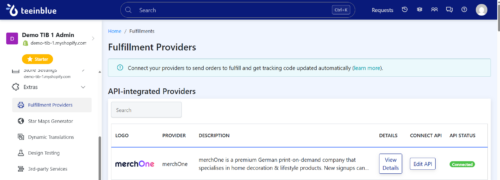
Once a Teeinblue account is connected to a merchOne store, four operations run automatically:
- Catalog browsing inside Teeinblue — the full merchOne product catalog is visible and searchable directly within the Teeinblue interface
- One-click product import — selected merchOne products import to Teeinblue with all mockups, size variants, frame options, SKUs, and print area dimensions populated automatically
- Direct order routing — customer orders flow from Shopify through Teeinblue to merchOne via API, with no CSV exports or manual file uploads required
- Automatic tracking sync — carrier tracking numbers from merchOne push back through Teeinblue to update the corresponding Shopify order
The integration is API-direct on both sides, but with one intentional step built into the workflow: after checkout, the order lands in your Teeinblue dashboard for review, not directly in production. You verify the personalization details, confirm the customer’s information, then click “Send” — the order moves to merchOne’s production queue within minutes.
From there, merchOne’s fulfillment kicks in, with production routed to whichever of the four owned facilities — Columbus (US), Latvia, Poland, or Germany — sits closest to your customer’s region.
This review step exists to ensure every order is accurate before it goes into production. It’s a quick double-check that catches typos, mismatched designs, or incorrect personalization upfront — keeping error rates low, reducing costly reprints, and protecting your reorder rate over the long run.
How to connect Teeinblue to a merchOne store
Setting up the integration takes about 10 to 15 minutes and requires admin access to both accounts. Each new integration needs its own dedicated merchOne store rather than reusing an existing one.
The setup runs in nine steps:
- Log in to the merchOne dashboard and go to Stores
- Click Create under “Create your custom store”
- Enter the store name, Shopify subdomain URL, selling region, and select Teeinblue as the integration type
- Open the new store’s Settings
- Scroll to the Store credentials section and copy the API USER and API KEY
- In Teeinblue, paste the credentials in the format API USER:API KEY
- Copy the Webhook URL Teeinblue displays
- Paste the Webhook URL back into the merchOne store settings
- Save updates on both sides
The connection goes live immediately after saving. The merchOne catalog becomes browsable inside Teeinblue, and any orders placed after this point flow between the two platforms automatically.
What sellers can offer with Teeinblue and merchOne together
The product range available through the integration covers merchOne’s full catalog, with personalization layers applied through Teeinblue. The strongest-performing categories for personalized POD include:
Wall Decoration
- Canvas in 2 cm and 4 cm depths, plus Canvas Wall Hanging
- Framed Canvas, Framed Poster, and Framed Fabric Wall Art
- Acrylic Print, Premium Acrylic Print, and Acrylic Print on Metal
- Metal Print and Metal Print (Gloss Finish)
- Poster and Adhesive Poster
- Photo Board and Framed Photo Board
- Wall Tapestry and Wood Panel
- MIXPIX® and Framed MIXPIX®
- Specialty pieces including Passepartout, Round Photo Print, Kid’s Measuring Bar, and Metal Door Plate
Home Decor & Accessories
- Mugs in multiple styles: Classic Mug, Premium Mug, Enamel Mug, Magic Mug, Heart Mug, and Inner Colored Mug
- Premium Pillow, Cotton Pillow, and Premium Blanket
- Bed Linen and Cotton Bed Linen
- Heart Keyring, Acrylic Heart, Acrylic Block, and Heart Rug
- Tote Bag and Weekender Tote Bag
- Towel, Sports Towel, and Mouse Pad
- Puzzle, Notebook, MIXBLOX, and Glitter Picture Frame
Apparel
- Unisex T-Shirts from Bella Canvas 3001, Comfort Colors 1717, Gildan 5000, and Stanley Stella Creator 2.0
- Premium Men’s, Women’s, and Unisex options
- Unisex Hoodies including Stanley Stella Cruiser 2.0, Gildan 18500 / SF500, Lane Seven 14001, and B&C WU33B
- Unisex Sweatshirts from Gildan, Lane Seven, and Stanley & Stella
- Baby Bib
Pet Products
- Dog Bowl in double-wall stainless steel
- Dog Pillow and Paw Rug
- Treat Jar
Seasonal Collections
- Christmas Bauble Ornament, Wooden Snowflake Ornament, and Clear Snowflake Ornament
- Mother’s Day Collection
- Father’s Day Collection
The personalization layer is product-agnostic. Text fields, photo uploads, font selectors, color pickers, and live preview work the same on a Classic Mug as they do on a 60×80 cm Framed Canvas, which makes it straightforward to extend a single proven design across multiple product types and price points.
What Teeinblue costs
Teeinblue uses different pricing structures depending on the platform you sell on, with a 14-day free trial across all plans and full feature access during the trial period.
Here’s how the plans break down:
- Teeinblue for Shopify — flat $49/month subscription with the first 100 orders per month included at no transaction fee. Beyond that, a small pay-as-you-go transaction fee applies per additional order, with no cap on products, personalization fields, or design templates.
- Teeinblue for Etsy — flat $49/month subscription with the first 20 orders per month included at no transaction fee. From the 21st order onward, a $0.10 transaction fee applies per order.
- Teeinblue Boundless — flat-rate plan for WooCommerce, BigCommerce, Prestashop, and other website builders, billed at $396/month with no transaction fees on any orders. Includes 1-on-1 onboarding for setup.
The single-plan structure across Shopify and Etsy keeps pricing predictable as your store scales — you know your monthly base cost upfront, with transaction fees only kicking in once you exceed the included order volume. Boundless suits high-volume sellers on non-Shopify platforms where the no-transaction-fee model offsets the higher monthly base.
All plans include unlimited products, design templates, personalization fields, and live preview — regardless of which platform you sell on.
Get 50% off Teeinblue for your first month
Install Teeinblue on Shopify through the link below and the 50% discount applies automatically for one month.
Discount auto-applies through this link only.
Getting a personalized merchOne product live
A first personalized merchOne product can go live in 30 to 60 minutes if the seller already has a merchOne account and a base design ready. The recommended starter setup:
- Install Teeinblue Product Personalizer from the Shopify App Store and start the free trial
- Connect Teeinblue to the merchOne account using the nine-step process above
- Browse the merchOne catalog inside Teeinblue and import a starter product (a 30×40 cm Canvas (2 cm) with a single text personalization field is the most forgiving)
- Open the imported product in the Artwork Editor, upload the base design, and add a text field for the customer’s input
- Save the artwork, link it to a Shopify product, and set the live preview position on the product page
- Place a test order from the seller’s own store before publishing
Always run a test order before going live. The test catches print misalignments and missing personalization fields that the editor preview won’t show, which is the most common source of avoidable refund requests on a new product.
Pre-launch setup that pays off later
A few production details are worth dialing in before publishing a personalized product:
- Update the product description and shipping FAQ to set realistic expectations on turnaround time, including personalization processing on top of standard production time
- Order a physical sample of any new product before going live — samples are available at base price and almost always reveal print details the digital preview missed
- Turn on the DPI warning for customer photo upload fields inside Teeinblue, so customers upload a higher-resolution image before checkout
- Build a clear shipping and returns page explaining that personalized products can’t be returned for buyer’s remorse, while production defects, print errors, and damaged-in-transit items are reprinted at no charge
These four steps remove most of the post-launch support tickets that new personalized POD stores tend to generate.